8. X-script 3D Graphic panel
8.1. VMI API
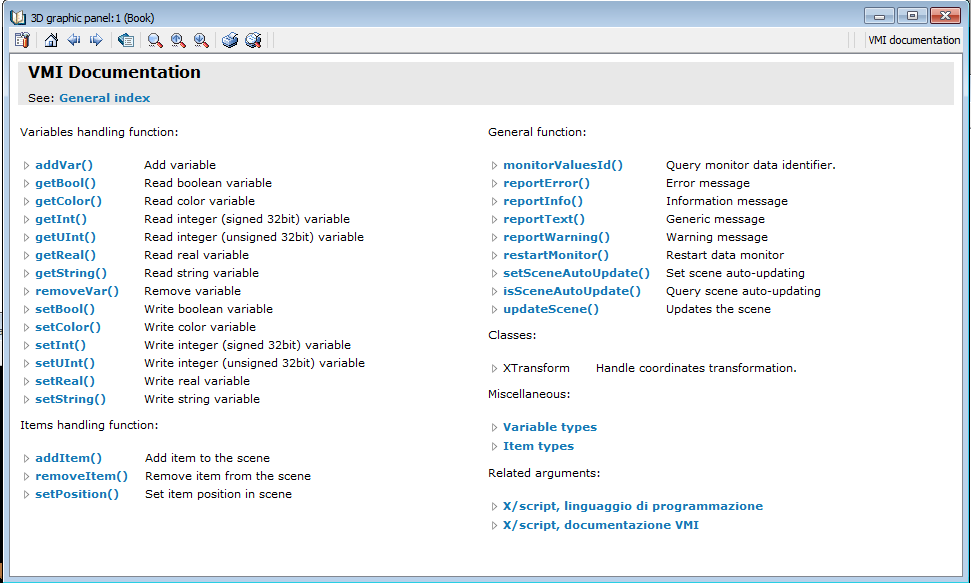
3D graphic panel VMI documentations
Documentation –> RDE documention –> 3D graphic panel –> VMI documention
The complete projects can be found in the predefined exmples in RDE. We will use Element location and Rod crank predefined examples.
8.2. Element location
; ===========================================================================
; ROBOX SpA
; Via Sempione 82, Castelletto Ticino, ITALY
; +390331922086
; http://www.robox.it
; ---------------------------------------------------------------------------
; Script.......:
; Description..: 3D graphic panel customization
; ===========================================================================

; How to use:
; set here the name of rc_elementlocation instance, then save and start the panel
; Note: you must use rc_elementlocation V 1.3.0 or above


$DEFINE EL_NAME "LOV:buffer_belt"


; ---------------------------------------------------------------------------


addVar(varInt, "elem_nr", EL_NAME + ".NUMBER_OF_ELEMENTS")
addVar(varReal, "el_dim", EL_NAME + ".DISTANCE2END")
addVar(varReal, "passo", EL_NAME + ".VIEW_SCALE")
addVar(varInt, "orig_sin", EL_NAME + ".ORIG_SIN_MARK")
addVar(varBool, "log_inp", EL_NAME + ".LOG_INP")

int elem_nr
real el_dim
real el_offset
int i
int sts
int orig_sin
bool log_inp

restartMonitor ()

sleep(1000)


elem_nr = getInt("elem_nr")
el_dim = getReal("el_dim") * getReal("passo")
el_offset = el_dim * 0.5
orig_sin = getInt("orig_sin")

for (i=0, i<=elem_nr, i=i+1)
	addItem(itemBox, "elem-"+i, "visible="+EL_NAME+".VIEW_PRES["+i+"];posX="+EL_NAME+".VIEW_POS["+i+"];width=0;color=#FFC800;height=50;length=100;offsetX="+(-el_offset)+";offsetZ=25")
	addVar(varReal, "dim-"+i, EL_NAME+".VIEW_DIM["+i+"]")
	addVar(varInt, "sts-"+i, EL_NAME+".VIEW_STS["+i+"]")
end

setReal("piano.width",el_dim + 200)
for (i=1, i<=16, i=i+1)
	setReal("end-"+i+".posX",el_offset)
end
for (i=1, i<=10, i=i+1)
	setReal("start-"+i+".posX",-el_offset)
end


restartMonitor ()


while (not shouldEnd ())

	log_inp = getBool("log_inp")

	for (i=0,i<=elem_nr,i=i+1)
		setReal("elem-"+i+".width",getReal("dim-"+i))
		sts = getInt("sts-"+i)
		if (sts == 0)
			setString("elem-"+i+".color", "#1F1F1F")
		else
			if (not (sts & 0x01000000))
				setString("elem-"+i+".color", "#7FFF7F")
				if (sts & orig_sin)
					log_inp = false
				end
			else
				if (sts & 0xFF)
					setString("elem-"+i+".color", "#FF0000")
				else
					setString("elem-"+i+".color", "#FFC800")
				end
			end
		end
	end
	setBool("start-7.visible", not log_inp)
	setBool("start-10.visible", log_inp)

end
8.3. Rod crank
; ===========================================================================
; ROBOX SpA
; Via Sempione 82, Castelletto Ticino, ITALY
; +390331922086
; http://www.robox.it
; ---------------------------------------------------------------------------
; Script.......:
; Description..: 3D graphic panel customization
; ===========================================================================

; How to use:
; set here the name of rc_rod_crank OB instance, then save and start the panel

$define rc_sys "biellaman"
;$define rc_sys "ROD_CRANK_INSTANCE_NAME"

; ---------------------------------------------------------------------------

; TODO: initialization here
addVar(varReal, "LB", rc_sys + ".rod_len")
addVar(varReal, "RM", rc_sys + ".crank_len")
addVar(varReal, "DA", rc_sys + ".h_pivot")
addVar(varReal, "alfa", rc_sys + ".panel_alfa")
addVar(varReal, "pos_x", rc_sys + ".pos_x")
addVar(varReal, "pos_off", rc_sys + ".pos_offset")
addVar(varReal, "ang_off", rc_sys + ".ang_offset")
addVar(varBool, "rad_angle", rc_sys + ".rad_angle")
addVar(varBool, "reverse_dir", rc_sys + ".reverse_dir")

real rodX
real rodY
real rodAng
real RM
real LB
real DA
real alfa
real beta		; rod rotation angle an Y axis. Positive sign clockwise under RM top
real LBx
real LBy
real pos_x
real pos_off
real ang_off
real alfa_print
bool rad_angle
bool reverse_dir

; call restartMonitor () to dynamically resynchronize the data monitor
restartMonitor ()

sleep(1000)

LB = getReal("LB")
RM = getReal("RM")
DA = getReal("DA")
pos_off = getReal("pos_off")
ang_off = getReal("ang_off")
rad_angle = getBool("rad_angle")
reverse_dir = getBool("reverse_dir")

; reverse system
if(reverse_dir)
	pos_off = -pos_off
endif

; dimensioni biella manovella
setReal("crank.LineHeight",RM-50)		; -50 to be coherent with drawn
setReal("rod.Width",LB)

setReal("testo.PosX",1.5*RM)
setReal("testo.PosZ",1.5*RM)

setReal("testo2.PosX",1.5*RM)
setReal("testo2.PosZ",1.2*RM)

while (not shouldEnd ())
	; TODO: periodic handling

	pos_x = getReal("pos_x")
	alfa = getReal("alfa")

	if(not rad_angle)
		alfa_print = alfa		; BEFORE alpha conversion
		alfa = degToRad(alfa + ang_off)
	else
		alfa_print = radToDeg(mod(alfa, 2*pi))
		alfa = alfa + ang_off
	endif

	; reverse system
	if(reverse_dir)
		alfa = pi + alfa
	endif

	LBx = pos_x - pos_off - RM*sin(alfa)
	LBy = RM*cos(alfa) - DA

	beta = atan2(LBy, LBx)
	setString("testo.text", strformat("alpha: %.2f deg", alfa_print))
	setString("testo2.text", strformat("pos: %.2f mm" ,pos_x))

	rodX = RM*sin(alfa) + 0.5*LB*cos(beta)
	rodY = RM*cos(alfa) - 0.5*LB*sin(beta)
	rodAng = radToDeg(beta)

	setReal("crank.beltPos",radToDeg(alfa))
	setReal("rod.posX",rodX)
	setReal("rod.posZ",rodY)
	setReal("rod.posB",rodAng)

	setReal("elbow.posX", RM*sin(alfa))
	setReal("elbow.posZ", RM*cos(alfa))

	setReal("tool.posX",pos_x - pos_off)
	setReal("tool.posZ",DA)

	sleep (100) ; 10hz loop
end

; TODO: termination here